The Idea Wasn’t New. Applying It Here Was.
I had seen a similar automation approach used in another clinical data environment.
The general idea was straightforward: instead of manually preparing validation scripts from study-build information, automate as much of that preparation as possible.
Later, I encountered a similar problem in my own organization.
Preparing UAT scripts for Medidata Rave study builds involved significant manual effort. A Lead Data Manager would review the study specifications, identify the programmed behavior requiring validation, and translate that information into a structured Excel workbook.
For a sufficiently large study, preparing that workbook could take approximately one working day.
Having seen the general automation concept work elsewhere, the question became:
Could I independently build an implementation around our own Rave study-build and validation workflow?
That became ECD Generator.
The Problem: Too Much Time Was Going Into Preparation
Before a clinical study built in Medidata Rave can be deployed, its programmed behavior needs to be validated.
That can include:
- CRF data-entry validation
- visit and form workflow
- screen dynamics
- data derivations
- custom functions
- field-level system checks
The existing process required Data Management to manually translate this study logic into validation content for peer review and UAT execution.
The work itself was necessary.
The amount of repetitive preparation wasn’t.
The same broad pattern repeated from study to study:
Review → identify → organize → populate → review → test.
That made the workflow a strong candidate for automation.
Building an Independent Solution
I designed and developed ECD Generator — Edit Checks and Derivations Document Generator — as an independent implementation of the general automation concept I had previously seen.
The objective wasn’t to reproduce another organization’s system. It was to determine how the concept could be adapted to our own workflow and build a solution appropriate for that environment.
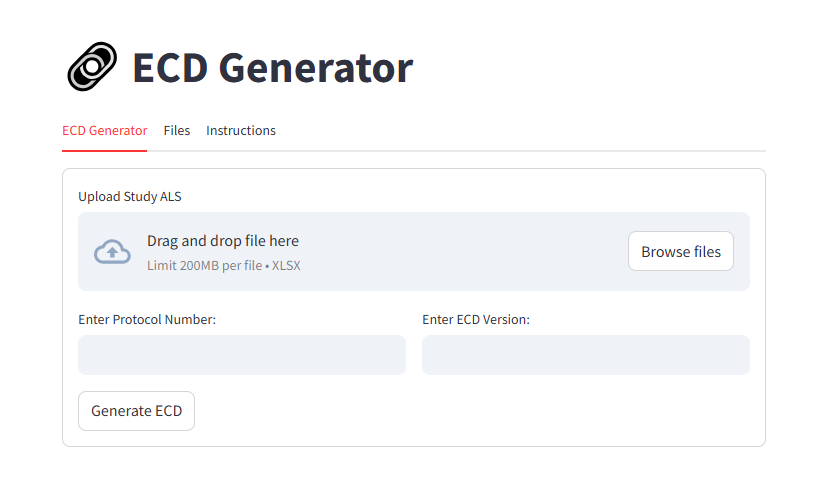
ECD Generator uses the Medidata Rave Architect Loader Spreadsheet (ALS) as its primary study input.
The user provides three things:
- the Rave Architect Loader Spreadsheet;
- the study protocol number; and
- the required ECD version.
The application then generates the corresponding Excel validation workbook.
ALS + Study Information → ECD Generator → Validation Workbook
I built a lightweight Streamlit interface to keep the user-facing workflow simple:
Upload → Generate → Download → Review
What the Tool Generates
ECD Generator produces a structured Excel workbook covering six areas of study-build validation.
| Output | What it covers |
|---|---|
| Validation Scripts | CRF data-entry validation |
| Matrix Scripts | Visit and form workflow |
| Screen Dynamics | Dynamic form behavior |
| Derivations | Programmed data derivations |
| Custom Functions | Applicable custom-function-driven logic |
| System Checks | Field-level system validation |
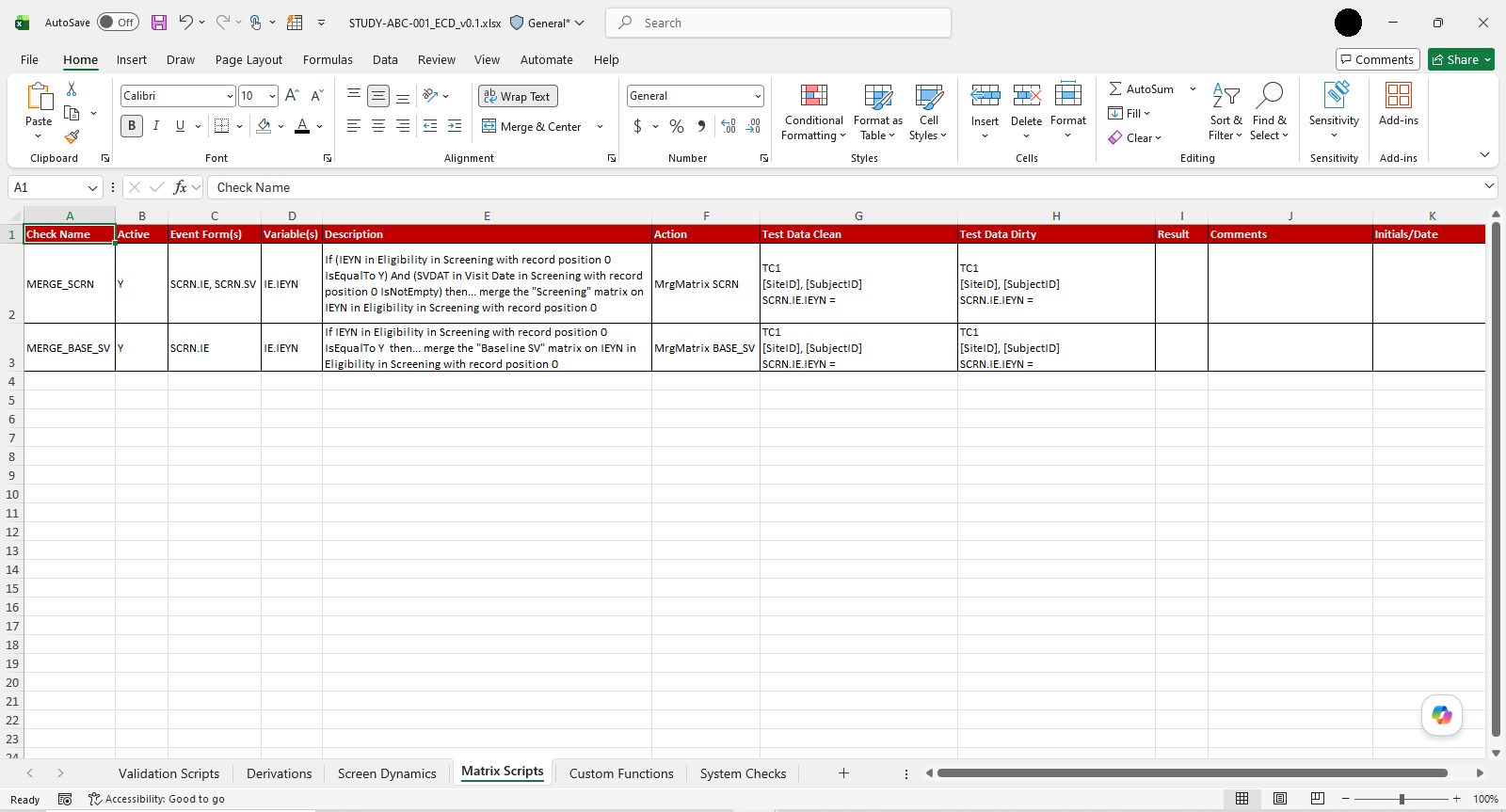
Example of the multi-sheet validation workbook generated by ECD Generator.
Instead of beginning with an empty validation template, the reviewer begins with a generated study-specific workbook.
The workflow shifts from:
“Build the validation artifact manually.”
to:
“Generate it, then apply human review and judgment.”
Designing It for More Than One Study
One of my key implementation goals was to avoid creating another study-specific script that would need to be rewritten for every new protocol.
ECD Generator was designed so that the same application workflow could be used across compatible Rave study builds.
Study A ─┐
Study B ─┼─→ ECD Generator → Study-Specific Workbook
Study C ─┘
I tested the application against multiple Rave studies during development.
No separate implementation was required for each protocol.
That made the project more than an automation script for a single study. It became a reusable workflow tool.
The Result
| Before | After |
|---|---|
| Approximately one working day | Less than three minutes |
| Manual workbook preparation | Automated workbook generation |
| Repeated preparation for each study | Reusable workflow across compatible studies |
| Human review required | Human review retained |
The generated workbook still required human review before UAT — deliberately.
Automation handled the repetitive preparation. People retained responsibility for validation coverage, study-specific test data, review, judgment, and UAT execution.
That boundary was important.
In a clinical environment, useful automation doesn’t necessarily mean removing the human from the process.
Sometimes the greater value comes from letting people spend less time preparing information and more time evaluating it.
So, Did It Go Into Production?
No.
And that became another useful lesson from the project.
ECD Generator reached a complete, functional state and was successfully tested against multiple Rave studies.
But technical feasibility is only one part of introducing automation into an established clinical process.
At the time, the organization’s study-build procedures had recently undergone significant changes. Introducing another workflow would have required an additional round of process and procedural updates, so the existing process was retained.
Building a better process and getting an organization to change its process are two different engineering problems.
One is largely technical.
The other involves timing, process ownership, validation, change management, and organizational priorities.
What I Actually Built
While the general automation concept was inspired by something I had seen used elsewhere, the ECD Generator implementation was independently designed and developed for our environment.
My work included:
- assessing how the automation concept could be applied to our existing workflow;
- defining the application requirements and user workflow;
- designing the validation workbook;
- designing and implementing the study-build processing and generation approach;
- developing the Streamlit interface;
- implementing Excel workbook generation; and
- testing the application against multiple Rave studies.
The application was built with Python, Pandas, Streamlit, openpyxl, and Excel.
The production source code and generation logic remain private. A portfolio-safe version of the project documentation, screenshots, and synthetic examples is available through the project’s GitHub repository.
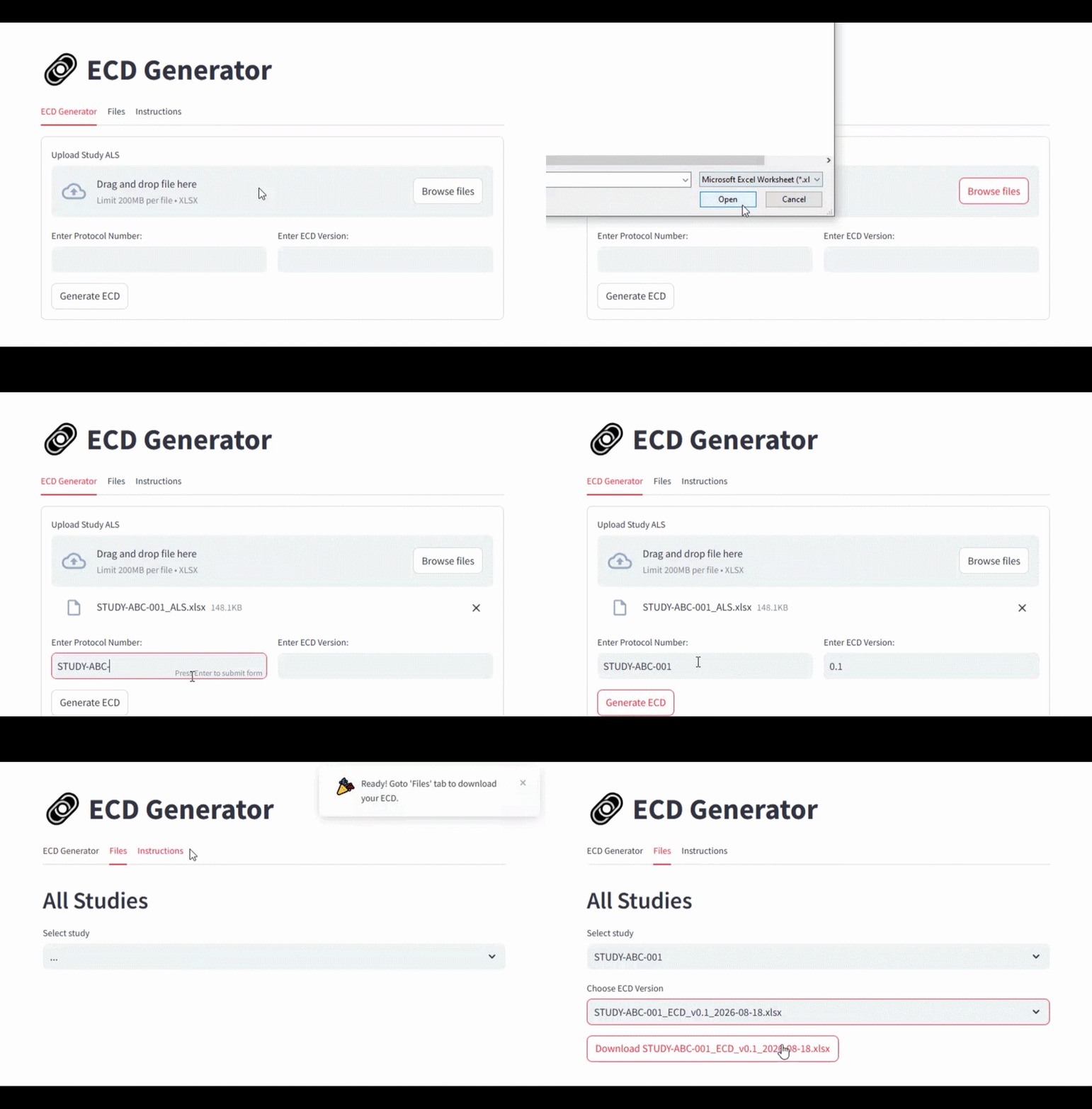
Short demonstration of the ECD Generator workflow.
The Bigger Lesson
ECD Generator wasn’t about inventing a completely new idea.
It was about recognizing a useful approach, understanding why it worked, identifying where the same principle could create value in a different environment, and then engineering an implementation appropriate for that context.
That is a form of problem solving I value increasingly:
You don’t always need to invent the idea. Sometimes the opportunity is recognizing where a good idea belongs and knowing how to build it there.
In this case, the result was a workflow that reduced approximately one working day of manual UAT preparation to less than three minutes of workbook generation during testing.
The broader takeaway for me was simple:
Look beyond the task in front of you. Study how others solve similar problems, understand the principle behind the solution, and ask whether you can apply it effectively in your own environment.